How to read the trace of every agent request
The trace lists every request an agent made through Cognibl: the tool, the key that asked, and whether it was allowed or denied. Here is how to read it and check that nothing was altered.
Before you start
- A project that at least one agent has called. An empty project has an empty trace.
- Membership of the project. The trace is per project and you see only the projects you belong to.
Step by step
Open the project's trace
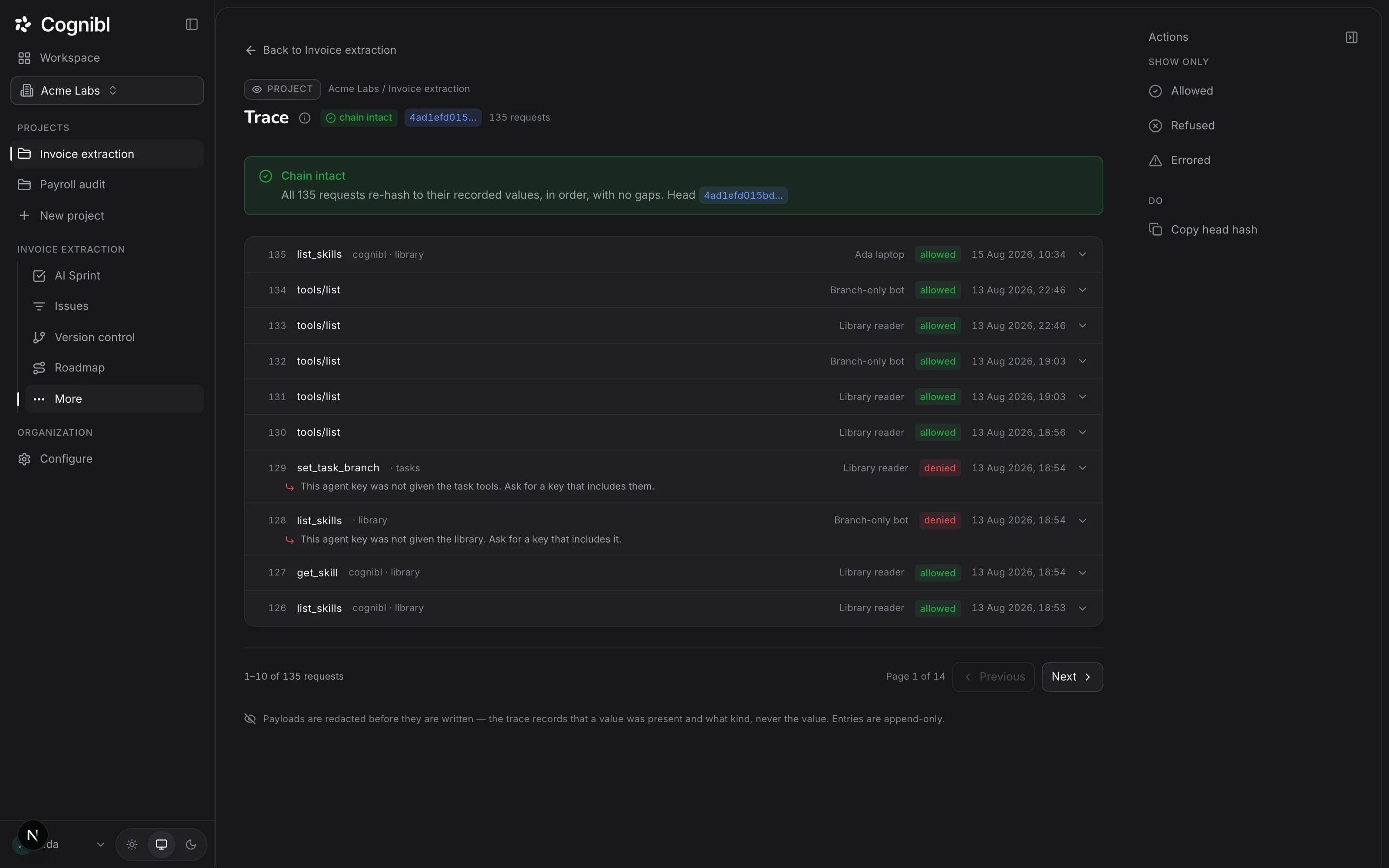
In the navigation rail, open the project and choose Trace. The header shows the state of the chain, the head hash and the number of requests recorded.
Screenshot from an earlier release. Some labels have changed and the steps use the current ones. Check that the chain is intact
Read the chip beside the title first. chain intact means every request re-hashes to the value recorded for it, in order, with no gaps. Each entry includes the hash of the one before it, so changing or removing an old entry would break the chain. If that ever happens the chip reads chain broken and a banner names the first request with a problem.
Read one request
Each row is one request. From left to right it shows the sequence number, the tool that was called, the toolset it belongs to, the name of the key that asked, the outcome and the time. The outcome is allowed, denied or error. Press the arrow at the end of a row to see how long the call took, its hash and the hash it follows.
Find what was refused
In the right rail, under Show only, press Refused. A denied row carries the reason in the gateway's own words, for example a key that was not given the task tools. Allowed and Errored filter the same way.
Copy the head hash
Under Do, press Copy head hash. The head hash stands for the whole trace up to that moment. Keep it somewhere outside Cognibl. If a later check still reaches the same hash at that position, the earlier entries have not changed.
What does a denied request tell you?
A denied row is the gateway doing its job. Each project decides which kinds of access agents get, and anything that is not switched on is refused and recorded. The agent gets the same sentence you see in the row.
Two patterns are worth knowing:
- One denial, then nothing. The agent asked for a tool it did not have, read the refusal and carried on with what it was given. No action needed.
- The same denial many times. The agent's instructions expect access the project has not given. Either switch that access on in project settings, on the Agent access tab, or change the instructions so it stops asking.
How is this different from the audit log?
The trace belongs to a project and records what agents asked the gateway for. The audit log belongs to the organization and records what was done to the workspace itself, such as a revoked agent key. Only owners and admins can read it. It has its own chain and its own head hash to copy.
What to check after reading
- The chip beside the title says chain intact.
- Every denied row has a reason you understand.
- The key names in the list are keys you recognise.
Questions
What people ask about the trace
What is recorded in the trace?
Every request an agent makes through Cognibl's gateway, whether it was allowed, refused or failed. Each entry records the tool, the key that asked, the outcome and the time.
Who writes the trace?
Cognibl's gateway writes it at the moment of the request. An agent does not report its own activity, so an agent cannot leave a request out.
Can a trace entry be edited or deleted?
No. Entries are append-only and nobody can edit or delete one, including Cognibl. Each entry includes the hash of the entry before it, and the check re-hashes the whole list, so a changed or missing entry would show as a broken chain.
Does the trace store the data an agent read?
No. Payloads are redacted before they are written. The trace records that a value was present and what kind it was, never the value itself.
Why was a request denied?
Because the project has not switched that kind of access on for agents, or the key that asked was not given that toolset. Access is denied by default, and the denied row says which of the two it was.
Is the trace in the free plan?
Yes. The gateway, limited agent keys and the hash-chained trace are in every plan, including Personal.
Have a question we did not answer? Ask us.