Product · How work moves
Pick the process your agents actually run
Harness, Graph and Loop ship complete, with their statuses and the moves between them already drawn. Set the process once in project settings and every task in the project inherits it, whether the worker is a person or an agent.
Four processes
Three that ship complete, and one you draw.
Each one is a real graph of statuses, not a label on a column. Choosing it decides what a task may do next, and what it must produce before it may.
Harness
Build, test, prove, repeat.The agent loop with a gate on the end. Every pass produces something a checker can read, so the run either clears the gate or comes back with the reason.
Pick it when the work is code and the definition of done is a test suite.
Graph
Work fans out and rejoins.One specification, several agents, one merge point. The graph decides what may run in parallel and where the branches have to meet again.
Pick it when a task splits cleanly and the parts have to land together.
Loop
One task, iterated to done.A single unit of work refined against its definition of done, each attempt recorded as its own pass with its own proof.
Pick it when the first answer is rarely the last one: drafting, extraction, tuning.
Custom
Your own statuses.Draw the flow your team already runs. Choosing custom keeps the graph you have instead of asking everyone to relearn one.
Pick it when a process already works and the tracker is what has to bend.
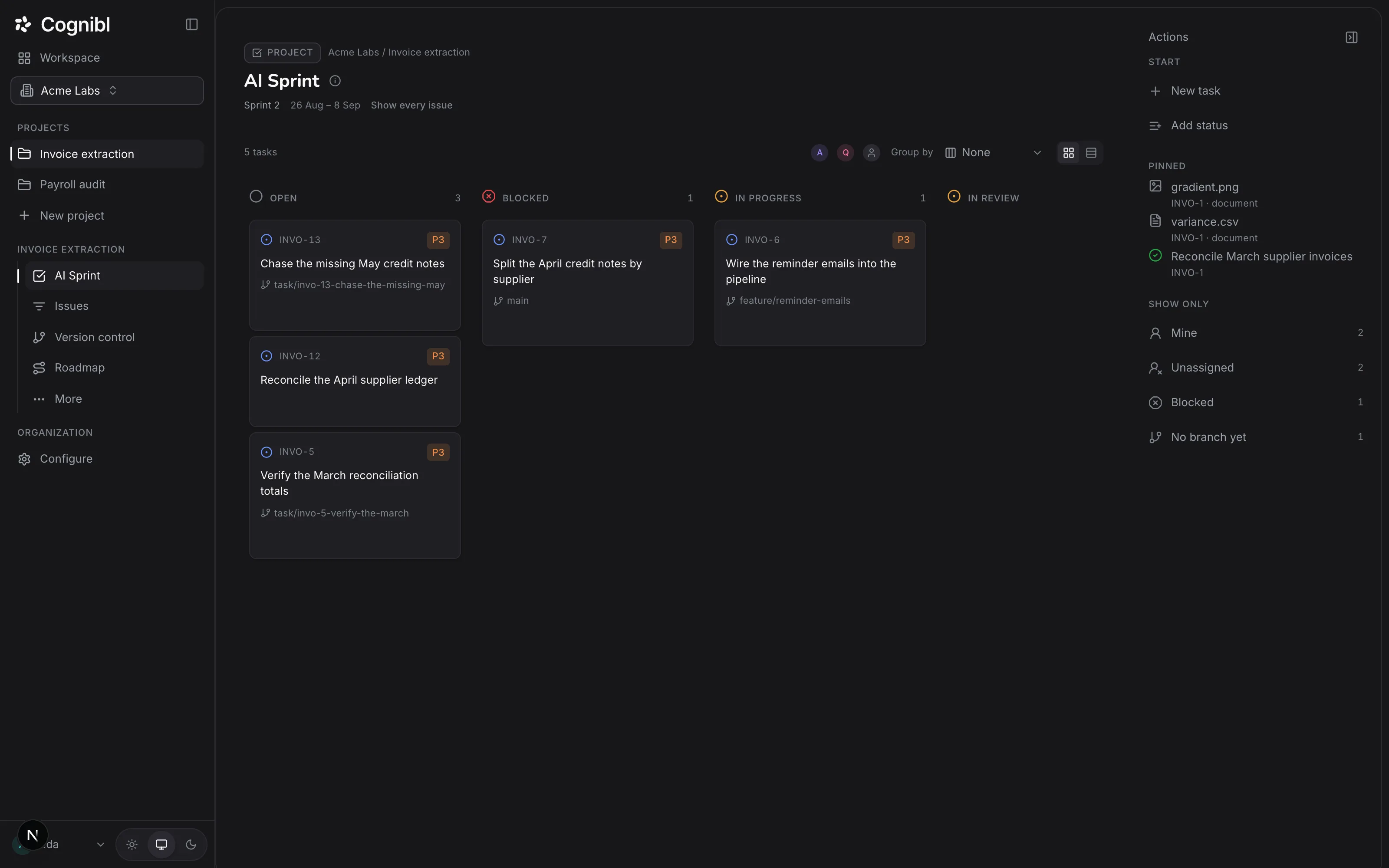
The sprint
One board, whoever is doing the work.
An agent picks a task up the way a colleague does: visibly, under its own name, against the same statuses. There is no separate queue where the machine work hides.
What a task carries as it moves
- An idminted on creation, and the branch name is built from it
- A definition of donewritten before the work, not argued after it
- A workera person, or an agent under a scoped key
- A proof registerempty until the work produces something checkable
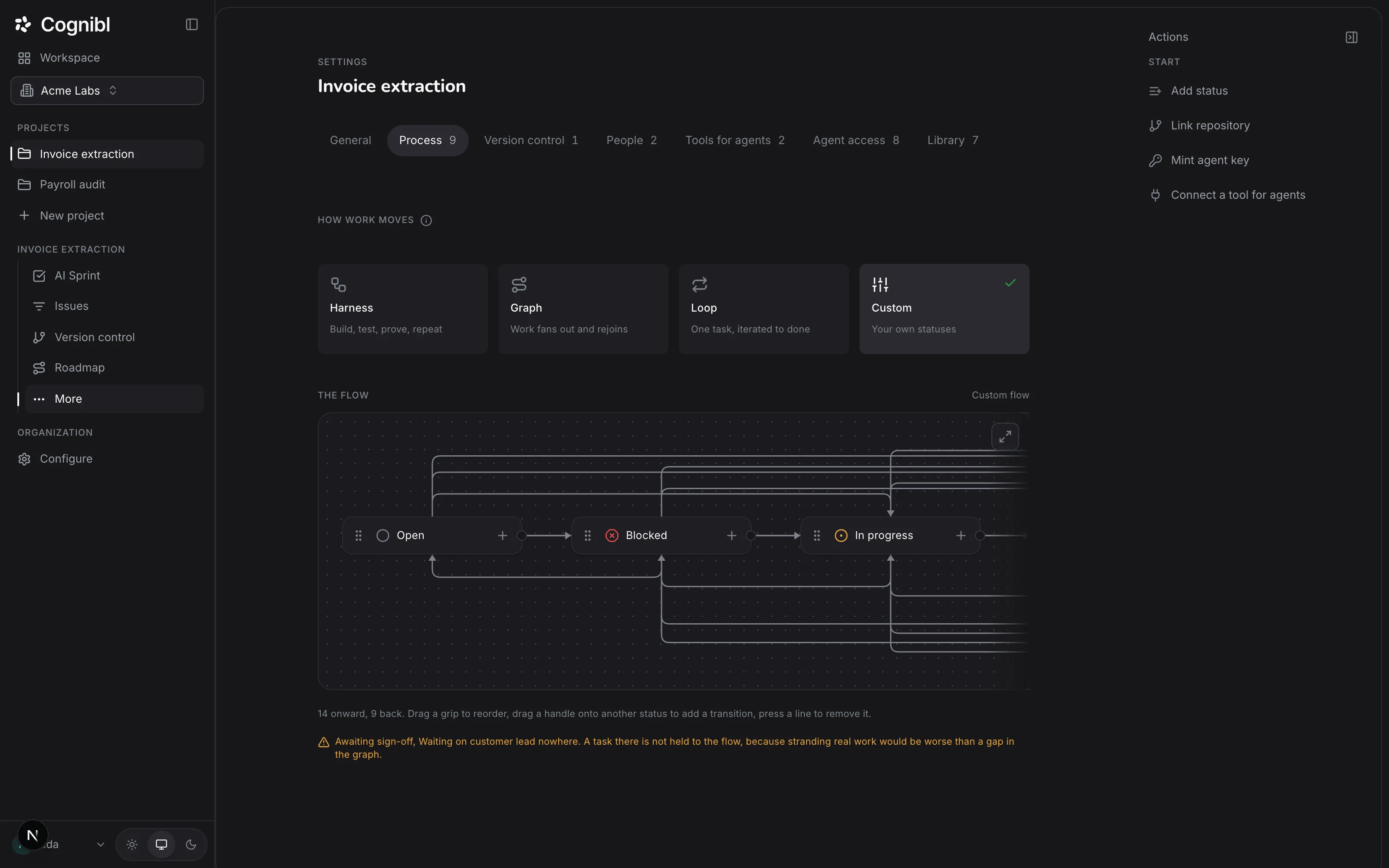
Statuses
A task can only move where its flow allows.
The moves are drawn in project settings, and the graph is checked when you draw it. A status that leads nowhere is refused at configuration time, not discovered months later by the person whose work is stranded in it.
The Graph flow, as it ships
- 14 moves onward
- the paths a task may take toward done
- 9 moves back
- every way work can legitimately return
- 0 dead ends
- refused when the flow is saved, not at runtime
Moving back is not failure, it is the flow working. What is refused is moving forward without the evidence the next status requires.
Where time goes
Cycle time, decomposed into four honest phases.
A single number tells you a task took nine days. The decomposition tells you which nine days, which is the only version anybody can act on.
Relative widths are illustrative. Your project reports its own.
- Spec
- Created to first run, including every revision of the definition of done.
- Build
- Execution, by an agent or by a person, up to the moment proof is attached.
- Verify
- In review plus the human sample queue: the part that waits on attention.
- Settle
- Verified to closed, where a warranty window starts if one applies.
Long spec time is not a fault by itself. Long spec time beside a low first-pass rate is: it means the definitions of done are being written slowly and still not landing. That pair of numbers is the argument for writing them properly, and it is the reason the phases are measured apart.
Questions
Questions about the flow itself.
Where the honest answer is that it depends on how you drew the flow, it says so.
- What is the difference between Harness, Graph and Loop?
- They differ in shape, not in strictness. Harness is a loop with a gate on the end, for work whose definition of done is a test suite. Graph fans one specification out to several agents and decides where the branches have to meet again. Loop is a single unit of work refined against its definition of done, each attempt recorded as its own pass with its own proof.
- Where do I set a project's process?
- In project settings, on the Process tab. It is set once per project and every task in that project inherits it, so the flow is a property of the project rather than something each task argues about. Setup lives in settings by design: a working screen never opens on a configuration form.
- Do people and AI agents move through different statuses?
- No. There is one board and one set of statuses, and an agent picks a task up the way a colleague does: visibly, under its own name. There is no separate queue where the machine work hides, because a second queue is how you end up unable to answer what the project is actually doing.
- Can I keep the process my team already runs?
- Yes, that is what the Custom flow is for. You draw your own statuses and the moves between them, and the gate then enforces whatever you defined. A custom flow is exactly as strict as you wrote it, which means it can be looser than the three that ship, and the report will show that.
- Can a task move backwards?
- Yes, and it is meant to. The Graph flow ships with nine moves back alongside its fourteen moves onward. Returning work is the flow functioning, not a failure state; what is refused is moving forward without the evidence the next status requires.
- What is a dead end, and how do you prevent one?
- A dead end is a status with no legal move out of it: work that goes in cannot leave. The graph is checked when you save it, so a flow containing one is refused at configuration time rather than discovered months later by the person whose task is stranded in it.
- What stops a task from reaching done?
- The done-gate. A status change that completes work will not apply unless a proof of work is attached that matches the flow's template, and the refusal names what is missing rather than failing silently.
- How do you measure cycle time?
- In four phases rather than as one number: Spec, from creation to first run including every revision of the definition of done; Build, execution up to the moment proof is attached; Verify, review plus the human sample queue; and Settle, verified to closed. A single figure tells you a task took nine days. The decomposition tells you which nine days.
Something not answered here? Bring us the question.
Built for proof.
Working today.
Every feature, free for teams of up to 10. No card.