How to link a GitHub repository to a project
Add a fine-grained GitHub access token as the project key, then pick the repository from a list. Cognibl reads branches and pull requests and matches each one to a task by its key.
Before you start
- The owner or admin role in the organization.
- A GitHub fine-grained personal access token for the repository. Listing repositories needs Metadata, cloning needs Contents with read, and letting agents push needs Contents with read and write.
Step by step
Open the Version control tab
Open the project, choose Settings and the Version control tab. It is headed Where work lands. With nothing set up, it says there is no project key and nothing to link yet.
Add the project key
Under Project key, press Add a key, paste the token into Fine-grained access token and press Save key. The key is stored encrypted and cannot be read back. Replace and Remove appear once it is saved.
Pick the repository
Press Link a repository and open the Repository picker. It lists the repositories the key can reach and names the GitHub account. If one is missing, its access is set on the token in GitHub. The last option lets you enter an owner and name yourself. Press Link.
Say where work is cut from
On the new row, set Work is cut from to the branch agents and people branch from. The default comes from GitHub. Set Deployed by to the workflow that ships it, or to It does not deploy, and name the environment under Called. Press Save.
Open the Version control screen
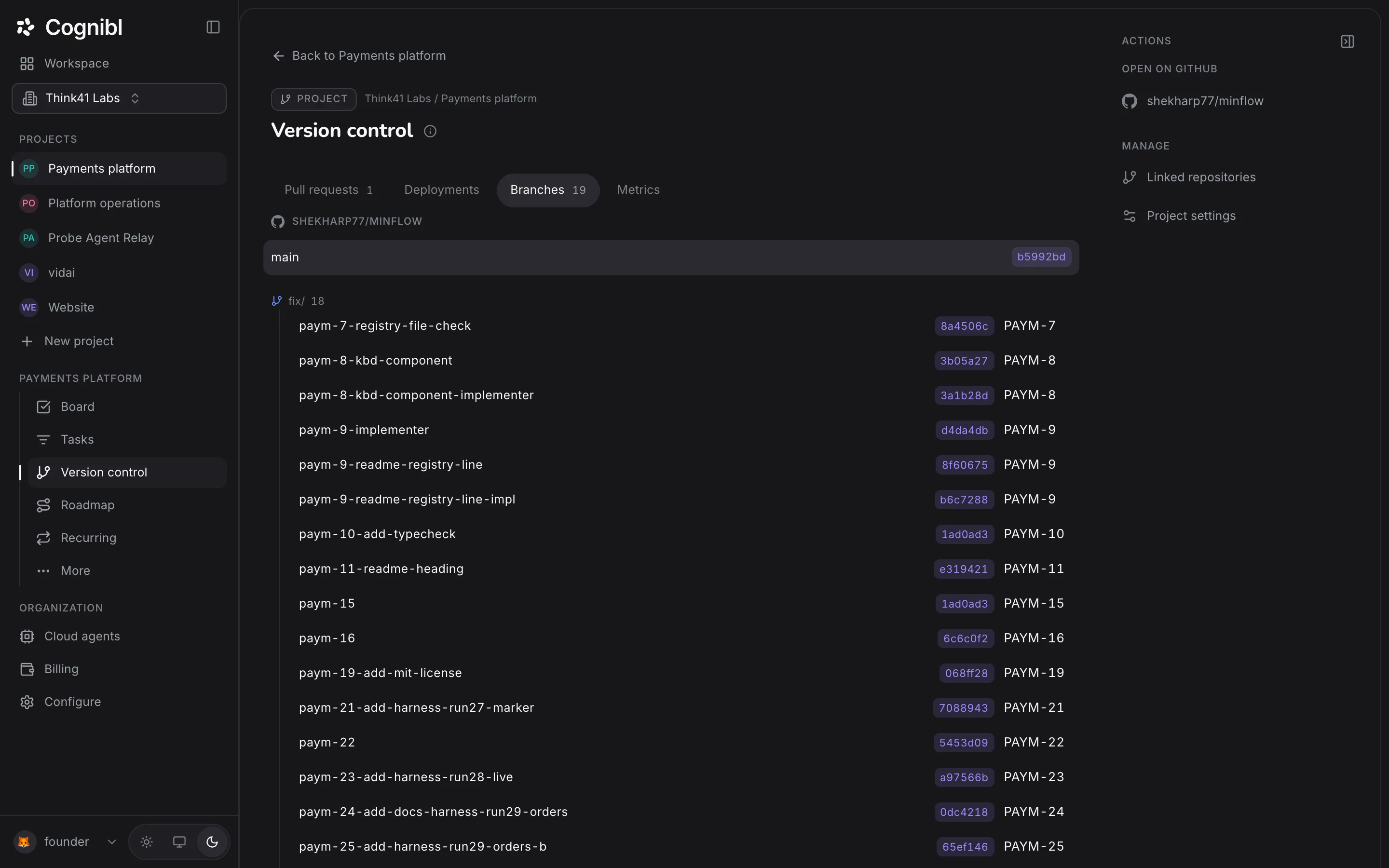
Choose Version control in the navigation rail. The tabs are Pull requests, Deployments, Branches and Metrics. The right rail links to the repository on GitHub and back to these settings.
Check that branches match tasks
On Branches, each branch shows its latest commit and the task it belongs to. Cognibl matches a branch to a task by finding the task key in the branch name, so a branch created by hand is picked up with nothing to configure.
How do you create the token?
In GitHub, create a fine-grained personal access token and limit it to the repositories this project uses. The permissions decide what Cognibl can do.
| You want | Repository permission |
|---|---|
| The repository to appear in the picker | Metadata: read |
| Agents that clone the repository | Contents: read |
| Agents that push branches | Contents: read and write |
A token limited to one repository gives the project access to that repository and nothing else in your GitHub account.
Why is this a project key and not a tool connection?
They answer different questions. A tool connection is something an agent may read through the gateway, and it belongs to the organization. Version control is the project's own record of where its work lands, so the key belongs to the project and only an owner or admin can add it.
What can an agent do with the repository?
With Code access switched on for the project, a cloud agent clones the repository through Cognibl, works on its own branch and pushes it. A push to the branch it cut from is refused, and the refusal tells the agent to push its task branch instead. An agent cannot merge. See the guide on following a task from branch to merge.
What to check after linking
- The Version control tab shows the repository and the branch work is cut from.
- The Branches tab lists branches, with a task key beside the ones that carry one.
- A task's Scope tab shows its branch as on GitHub once it has been pushed.
Questions
What people ask about linking a repository
Which version control providers work?
GitHub today. Other providers are refused with a message saying they are coming later.
What kind of GitHub credential does Cognibl accept?
A fine-grained personal access token, added as the project key. A GitHub App or OAuth sign-in is not offered today.
Does Cognibl copy my repository?
No. The code stays in your GitHub. Cognibl keeps references: the commit, the branch and the pull request number.
How should a branch be named?
Include the task key. Cognibl suggests a name made from a prefix, the key and the title: fix for a bug, feat for a story and task for a task, such as feat/pay-21-reconcile-payouts.
Do I need to set up a webhook?
No. A webhook makes updates arrive sooner, and the repository's row has a Push notifications section for it. Without one, Cognibl asks GitHub when somebody opens the task and catches up.
Why does the Version control screen say it needs a repository?
Because none is linked. The screen shows what is happening on a repository, and linking one is done in project settings. The message links to the tab that fixes it.
Have a question we did not answer? Ask us.
Keep reading
- How to set what AI agents can access in a projectSeven switches on the Agent access tab of a project control what agents may do, from reading tasks to cloning code. All start off.
- How to follow a task from branch to merged pull requestEach Cognibl task shows its branch, pull request, checks and deployment. Set the branch, read the state of the pull request and see what a merge does.
- All guidesEvery guide, in the order a new team needs them.