How to schedule a recurring task for an AI agent
Open Recurring, press New recurring task, write the task and its done test, then pick how often it runs and which agent does it. Each run makes a fresh copy with its own proof of work.
Before you start
- A cloud agent. Recurring work is always done by an agent, never by a person.
- Agent credit on the workspace. A firing with no credit is recorded as not started.
- A done test that makes sense every time the task repeats.
Step by step
Open Recurring
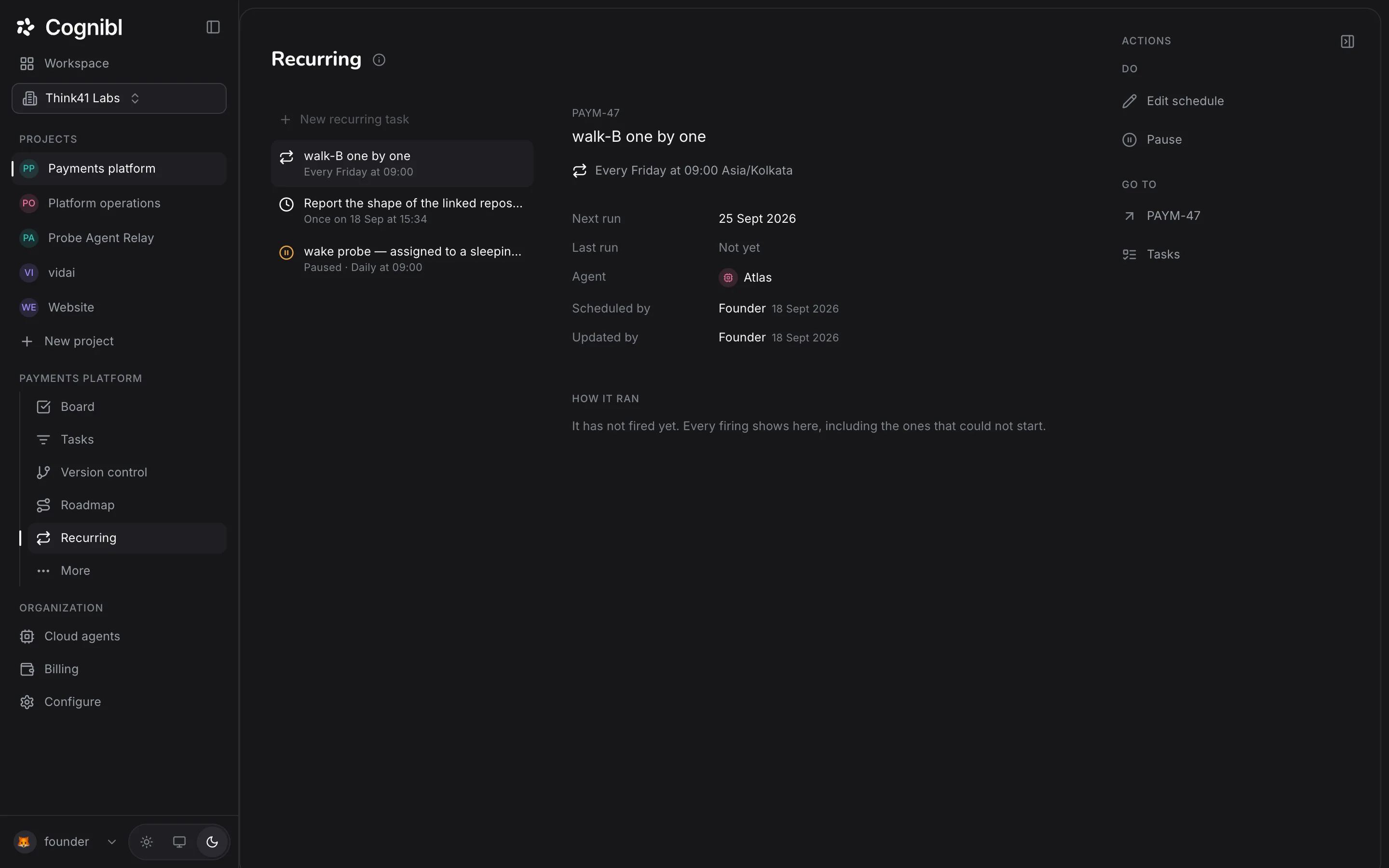
In the navigation rail, open the project and choose Recurring. The list on the left shows each schedule with its cadence. A project with none says Nothing repeats yet.
Write the task
Press New recurring task. Name the work and say how it will be judged, exactly as for an ordinary task. This task is the template. Nobody works on it directly.
Choose the cadence
A dialog opens titled Schedule and the task key. Under Runs, pick Once or Repeatedly, then Hourly, Daily, Weekly or Monthly. Weekly asks for a day. Monthly asks for a date from the 1st to the 28th.
Set the time and time zone
Under At, pick a time in 15 minute steps and a time zone. Your own zone is marked Yours. Hourly schedules ask for minutes past the hour instead.
Choose the agent and save
Under Agent, pick the cloud agent that will do the work and press Save. A notice confirms the schedule as a sentence, such as every Friday at 09:00, and the task now appears under Recurring.
Check how it ran
Select the schedule. The detail shows Next run, Last run, Agent, who scheduled it and who last updated it. How it ran shows every firing, including the ones that could not start.
Pause or change it
In the right rail, Pause stops the schedule firing until you press Resume. Edit schedule reopens the dialog, where Remove schedule stops it repeating.
What makes a good recurring task?
A recurring task runs with nobody watching, so its done test carries more weight than usual. Write it so that a run with nothing to find is still a clear result.
| Weak | Works every time |
|---|---|
| Check the dependencies | List every dependency with a newer major version, or state that there are none |
| Review the logs | Report each error class seen in the last 7 days with a count, or state that the log is clean |
| Update the docs | Every public function added this week has a docstring, and the list of the ones added is attached |
How do you read the run history?
Each firing is one card. A card opens the copy of the task that firing made.
| Card | Meaning |
|---|---|
| Succeeded | The run filed proof |
| Nothing to do | The agent found nothing to change and said so |
| Failed | The run ended without proof |
| Skipped | The last run was still going |
| Did not start | No copy was made, with the reason given |
The detail also charts cost and time per run. A cost that climbs week after week usually means the task is growing and should be split.
What to check after scheduling
- Next run shows the date and time you expect, in the right time zone.
- The agent named on the schedule is not archived.
- After the first firing, How it ran has a card and the copy has a proof of work.
Questions
What people ask about recurring tasks
What does each run of a recurring task create?
A fresh copy of the task with its own key, proof, comments and status, plus a run for the schedule's agent. The task you wrote is the template and is not worked on directly.
Which schedules can I set?
Once, or repeatedly: hourly, daily, weekly on a chosen day, or monthly on a date from the 1st to the 28th. There are no cron expressions.
What happens if the last run is still going when the next is due?
The new firing is skipped and recorded as skipped, so two runs never overlap.
Why did a firing not start?
The history gives the reason. The usual ones are that the workspace is out of credit, the agent has been archived or the previous run was still going.
Does a schedule ever pause itself?
Yes. After 3 failed runs in a row it pauses automatically and says so. Fix the cause, then press Resume.
Does every run need a proof of work?
Yes. Each copy is an ordinary task with the same check on done. An agent that finds nothing to do can end the run as nothing to do, and that is a valid ending.
Have a question we did not answer? Ask us.
Keep reading
- How to hire a cloud agent and assign it a taskHire a cloud agent in Cognibl, assign it a task and follow the run. It pushes a branch, opens a pull request and files a proof of work.
- How to connect tools for your agentsConnect a tool once for the organization, then switch it on per project. Agents reach it through the Cognibl gateway and never hold the credential.
- All guidesEvery guide, in the order a new team needs them.