How to plan a phase and run the board
A phase is Cognibl's two week block of work, the same idea as a sprint. Create one on the Tasks screen, move tasks into it from the backlog, start it and follow people and agents on one board.
Before you start
- A project with a few tasks in it.
- The names: Cognibl says phase where other trackers say sprint, and task where they say issue.
Step by step
Open the Tasks screen
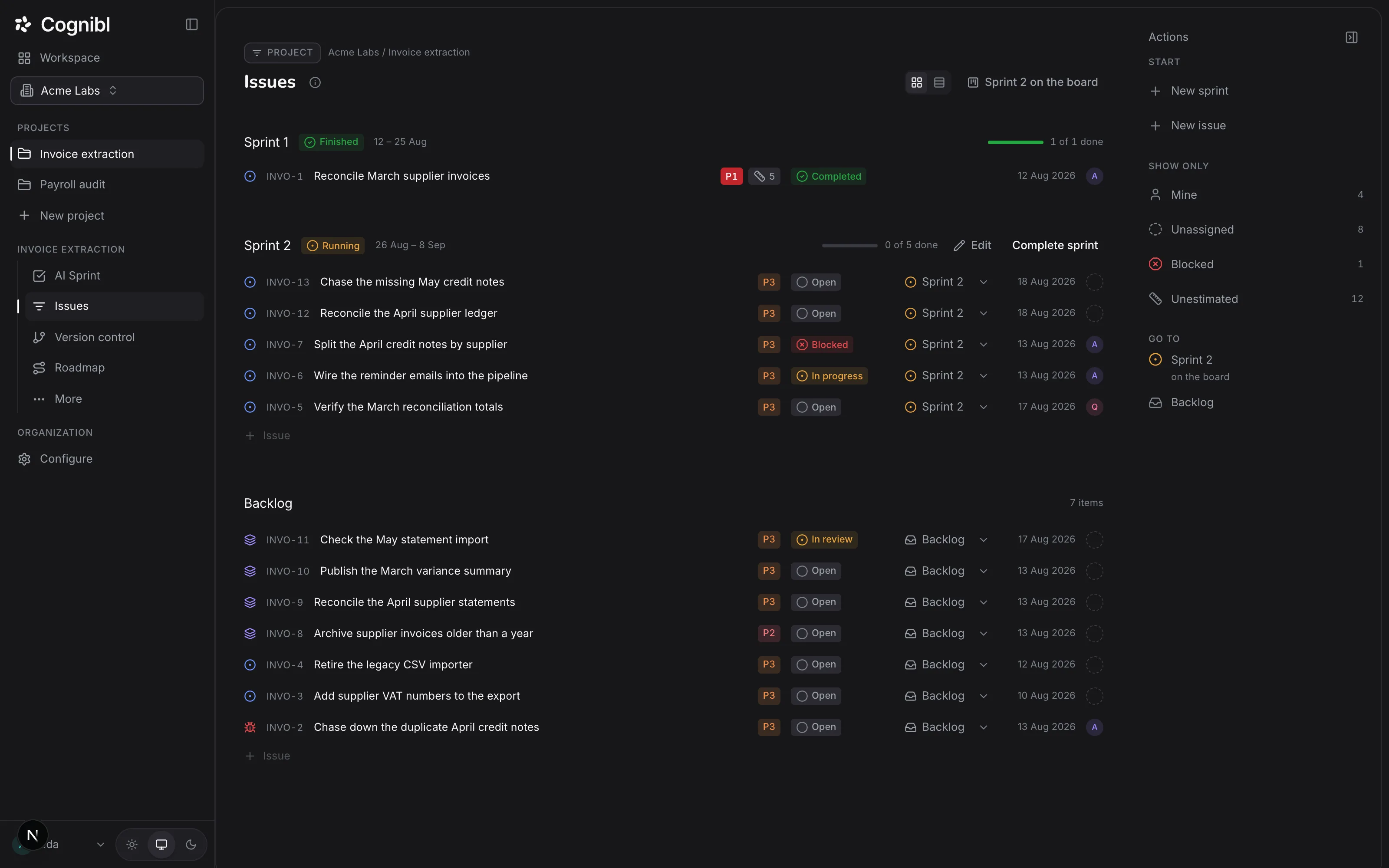
In the navigation rail, open the project and choose Tasks. Tasks are grouped by phase, with Backlog at the bottom. A new project already has a first phase that runs for 14 days.
Screenshot from an earlier release. Some labels have changed and the steps use the current ones. Create the next phase
In the right rail, under Start, press New phase and type a name. The dates are worked out for you: it starts the day after the last phase ends and runs for 14 days. To change the name or dates, edit the phase.
Move tasks into the phase
On each backlog row, open the phase picker, which reads Backlog, and choose the phase. Drag rows to reorder them. The rail filters under Show only narrow the list to Mine, Unassigned, Blocked or Unestimated.
Screenshot from an earlier release. Some labels have changed and the steps use the current ones. Start the phase
Start the phase when the team is ready. If another phase is running, starting this one completes it and moves its unfinished tasks into the new phase.
Work from the board
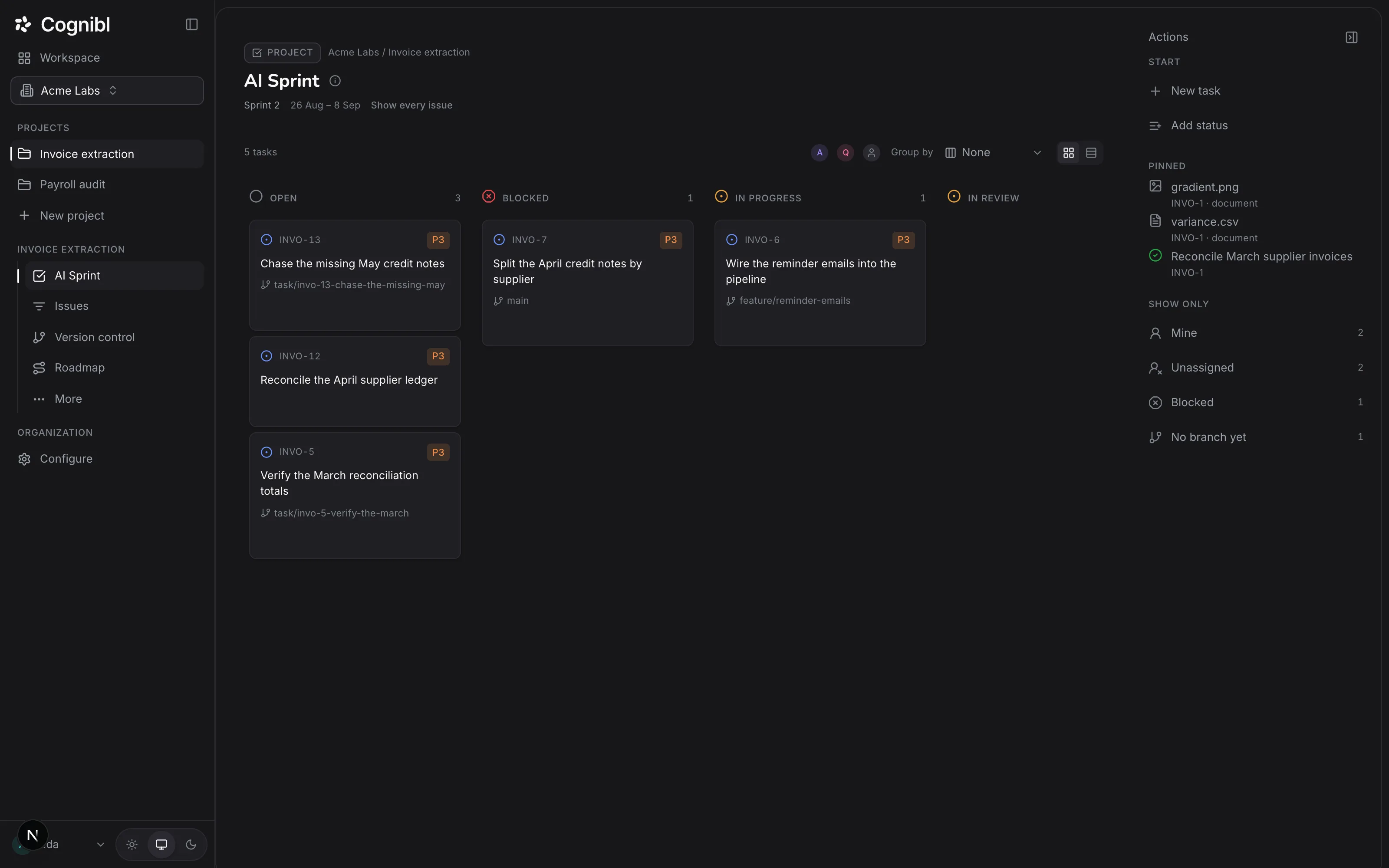
Choose Board in the navigation rail. It shows the running phase only, one column per status. Use Group by to split the columns by Priority, Assignee or Milestone. People and agents are on the same board, each under their own name.
Move a task
Drag a card to another column, or change Status on the task. A move the project's flow does not allow is refused with the reason. A move into a done status needs a proof of work on the task.
Complete the phase
Back on Tasks, complete the phase. Finished tasks stay in it and the phase becomes a record that cannot be edited or reopened. Unfinished tasks go back to the backlog.
What do the board filters tell you?
Each filter in the right rail is a count you can press, and each one answers a question worth asking during a phase.
| Filter | The question it answers |
|---|---|
| Mine | What am I holding? |
| Unassigned | What has nobody picked up? |
| Blocked | What is waiting on a person? |
| No branch yet | Which code tasks has nobody started? |
| Unestimated | Which tasks will not count toward effort delivered? |
Blocked deserves a look every day. When an agent's run ends without proof, its task moves to Blocked so that a person reads it before the agent tries again.
How should you size a phase?
Effort is in points on the scale 1, 2, 3, 5 and 8. The Delivered chart on the Metrics screen shows the points finished in each of the last 8 weeks. Use that history as the ceiling for the next phase. A task with no effort still gets done, but it adds nothing to that chart, which is why the Unestimated filter exists.
What to check during a phase
- Every task in the running phase has an assignee.
- Nothing has sat in Blocked for more than a day without a comment.
- Tasks near done have a proof of work, so the last day is not spent filing it.
Questions
What people ask about phases and the board
Is a phase the same as a sprint?
It does the same job: a named block of time with a start, an end and a set of tasks. Cognibl calls it a phase. New phases default to 14 days and you can change the dates.
What happens to unfinished tasks when a phase ends?
It depends on how you end it. Completing the phase sends unfinished tasks back to the backlog. Starting the next phase instead completes the current one and carries its unfinished tasks into the new phase.
Can I reopen a completed phase?
No. A completed phase is a record and cannot be edited or reopened. A phase that has started cannot be deleted either. It has to be completed.
Do AI agents have their own board?
No. There is one board and one set of statuses. An agent appears as the assignee on its cards the same way a person does.
Can I add a column to the board?
A column is a status. On the Custom process, press Add status in the rail, name it and say whether it counts as open, active or done. Harness, Graph and Loop ship their statuses, so adding one there is refused with a message telling you to choose Custom.
How do I see only my own work?
Press Mine under Show only in the right rail. The board also filters by Unassigned, Blocked and No branch yet.
Have a question we did not answer? Ask us.
Keep reading
- How to file proof of work and move a task to doneUpload a proof of work CSV on the Proof of work tab of a task. It is validated on upload, and once a version exists the task can enter a done status.
- How to hire a cloud agent and assign it a taskHire a cloud agent in Cognibl, assign it a task and follow the run. It pushes a branch, opens a pull request and files a proof of work.
- All guidesEvery guide, in the order a new team needs them.