How to plan milestones on the roadmap
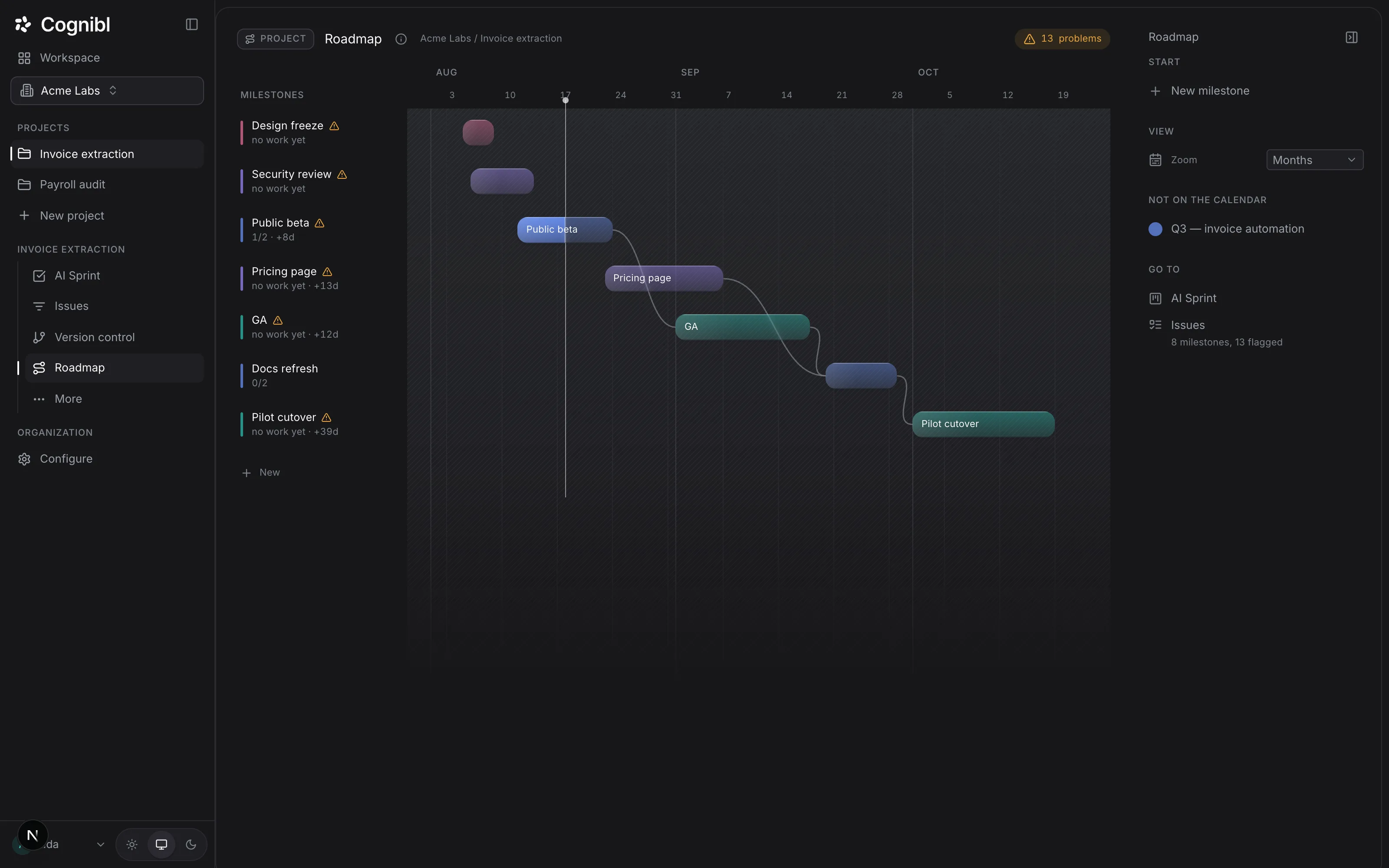
Open Roadmap, press New milestone and give it a name and dates. Drag from one bar to another to say what waits for what. The header counts the problems in the plan, such as a milestone past its end.
Before you start
- A project with tasks. A milestone with no tasks is flagged as empty.
- Rough dates. A milestone can be created without them and placed later.
Step by step
Open the roadmap
In the navigation rail, open the project and choose Roadmap. Milestones are listed on the left and drawn as bars on a calendar on the right. A line marks today.
Create a milestone
Press New milestone in the right rail. Fill in Name, and optionally Starts, Ends and Summary, then press Create milestone. You can also drag across the last row of the calendar to draw one.
Screenshot from an earlier release. Some labels have changed and the steps use the current ones. Put tasks in it
Open a task, expand More in the right rail and choose the milestone in Milestone. The milestone's row then shows how many of its tasks are finished, such as 1/2.
Say what waits for what
Drag from the right edge of one bar onto another. The second milestone now waits for the first, and a line joins them. A milestone cannot wait for itself, and a chain that would go round in a circle is refused.
Read the problems
The chip in the header counts the problems in the plan, and a warning mark sits beside each milestone that has one. The row beneath the name says how much of its work is finished, or that it has no work yet.
Change the zoom
Under View, set Zoom to Quarters, Months or Weeks. Milestones without dates are listed under Not on the calendar until you place them.
What do the five problems tell you?
Each one is a different kind of trouble and has a different fix.
| Problem | What it means | The fix |
|---|---|---|
| Impossible order | It starts before the milestone it waits for ends | Move it later or remove the dependency |
| Past its end | It is still open after its end date | Ship it, or set an honest date |
| Moved later | Its end date keeps drifting | Cut scope or accept the new date openly |
| Not scheduled | It has no dates | Give it dates or leave it off the calendar on purpose |
| Empty | It has no tasks | Add the tasks, or mark it cancelled |
How is a milestone different from a phase?
A phase is a block of time: two weeks of whatever the team is doing. A milestone is an outcome: something that ships, with the tasks that make it up. One milestone usually spans several phases, and one phase usually holds tasks from several milestones. The board can be grouped by milestone to see both at once. The guide on planning a phase covers phases.
What to check after planning
- Every milestone with dates has tasks in it.
- No milestone is marked as an impossible order.
- Not on the calendar holds only the milestones you chose to leave unplaced.
Questions
What people ask about the roadmap
What counts as a problem on the roadmap?
Five things. Impossible order: a milestone starts before the one it waits for ends. Past its end: it is still open after its end date. Moved later: its end date has drifted later. Not scheduled: it has no dates. Empty: it has no tasks.
How do I link a task to a milestone?
On the task, under More in the right rail, pick the milestone in the Milestone picker.
Can a milestone depend on more than one other?
Yes. Its detail lists what it waits for and what it blocks, and each dependency can be removed there.
What statuses can a milestone have?
Open, Shipped or Cancelled.
Do Jira epics become milestones?
Yes, when you import a Jira CSV export into a project. Epics become roadmap milestones and sprints become phases.
Is the roadmap a Gantt chart?
It reads like one: bars on a calendar with lines for dependencies. It also counts the problems in the plan and marks the milestones that have one.
Have a question we did not answer? Ask us.
Keep reading
- How to review an AI agent's code and send it backSwitch on Code review and name a reviewer. Each pull request is reviewed on every push. Read findings by severity and send the task back with them.
- How to read a project's metricsThe Metrics screen shows work remaining, effort delivered each week, cycle time split into Spec, Build and Verify, and first pass, wait and reopen rates.
- All guidesEvery guide, in the order a new team needs them.